Cost calculator for local AI: hardware and operations
Many companies are evaluating local AI language models to keep their data away from cloud providers. Local AI makes this possible: open-weight models run entirely on your own hardware, in your own data center or with a hosting partner you trust.
But what does it cost? Describe your use case and get a hardware recommendation in two minutes, including upfront costs and monthly total costs. The calculator is free and requires no sign-up.
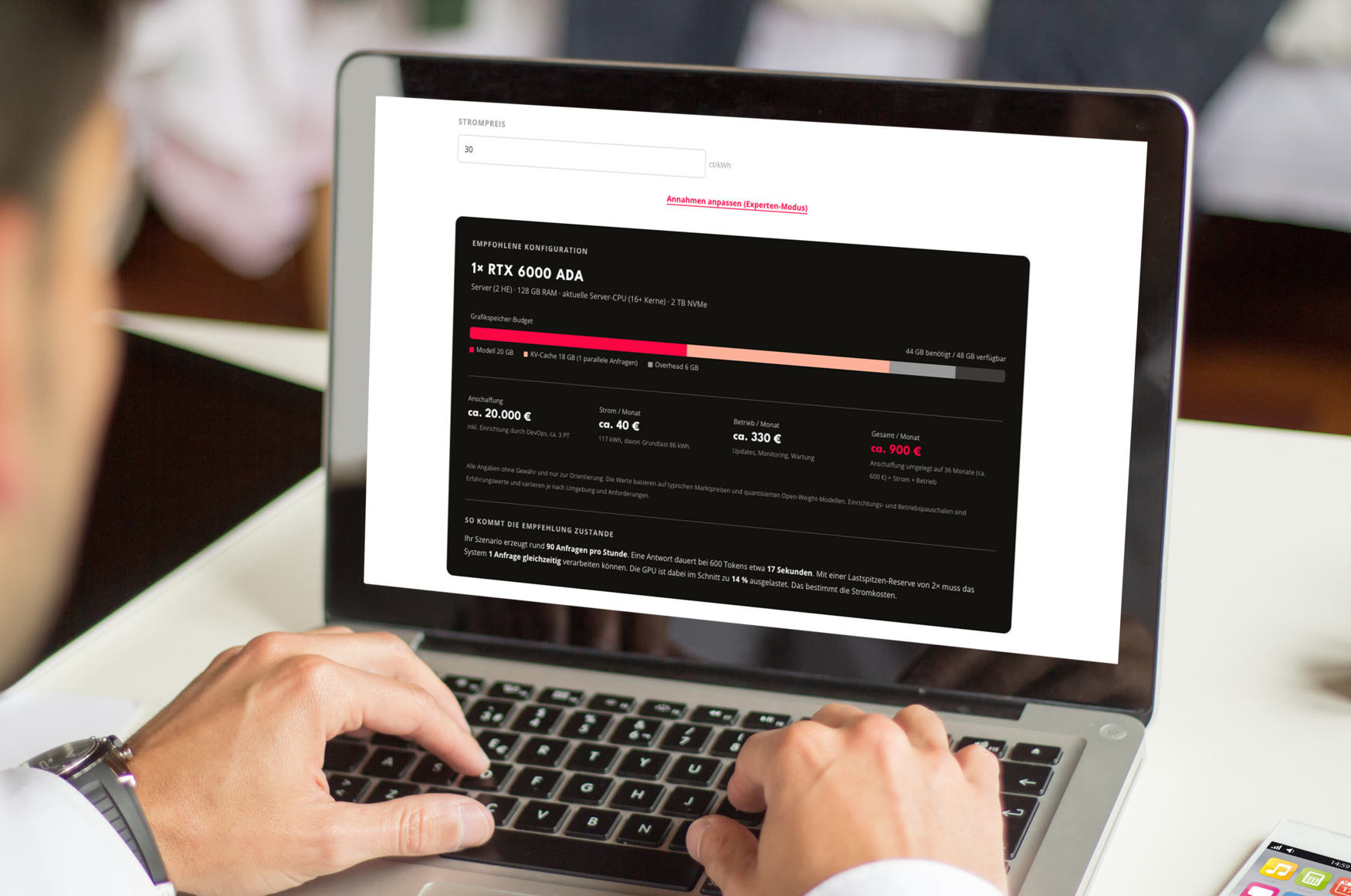
Local AI starts with the right hardware: Which graphics card, how much memory, and what are the operating costs? Just provide a few details about your use case, and the calculator will estimate the appropriate configuration, including purchase and operating costs. This way, you can get a sense of the scale of your project.
Calculator: hardware and operations
Longer contexts require significantly more GPU memory.
Stronger quantization saves GPU memory but reduces response quality.
Only effective with MoE models (frontier tiers). Significantly reduces GPU memory requirements but slows down responses considerably. For experiments and single users, not for production use with many requests.
How the calculator works
We work with five quality levels for open-weight models, with 4-bit quantization by default (customizable in expert mode).
- The Compact level refers to models with 7 to 8 billion parameters, such as Qwen3-8B or Llama 3.1 8B, which are sufficient for classification, extraction, and simple text tasks.
- Solid corresponds to the 30B class, such as Qwen3-32B or Gemma 3 27B, for code assistance and more demanding text tasks.
- Large covers dense models with 70 billion or more parameters, such as Llama 3.3 70B, representing the highest quality level of classical model architectures.
- Above these are two Frontier tiers featuring a mixture-of-experts architecture, in which only a portion of the model actively computes per query. “Frontier Compact” refers to models with 200 to 300 billion parameters, such as Qwen3-235B or DeepSeek V4 Flash, which come remarkably close to the performance of the largest models while being significantly more cost-effective to operate. Frontier encompasses the largest freely available models with over 700 billion parameters, which match the performance of commercial cloud models in many tasks.
In addition to the model weights, we factor in the memory requirements for the KV cache. This is the area of the graphics memory where the model stores the conversation history and documents it has read. It grows with the context length and the number of concurrent requests and is often underestimated in practice.
The recommendation selects the smallest configuration whose graphics memory is sufficient for the model, KV cache, and operational reserve. The range starts with a single RTX 4090 or RTX 5090 in a workstation (24 or 32 GB of graphics memory), continues with the RTX 6000 Ada (48 GB) in a server, and extends to systems with one, two, four, or eight RTX PRO 6000 Blackwell cards, each with 96 GB. This covers everything from a workstation costing around 7,000 euros (including setup) to a GPU server with 768 GB of graphics memory, on which even the largest open-weight models run entirely locally. If even that isn’t enough, you’ll be in the realm of custom-designed clusters, for which we do not quote flat rates.
For the Frontier tiers, Expert Mode also offers “Expert Offloading”: This offloads part of the model to RAM, allowing for smaller graphics cards but significantly slowing down responses. It’s an option for experiments and individual users, but we do not recommend it for production use.
When training language models, the GPU is almost always the bottleneck. We therefore size the CPU and RAM according to a rule of thumb: RAM must be at least twice the amount of graphics memory so that models can be buffered while loading and switching – ranging from 64 GB in workstations to 1.5 TB in the largest GPU server. A modern multi-core CPU with at least 16 cores and sufficient PCIe lanes for the graphics cards is sufficient. These components are included in the system prices. Important to note: ECC RAM, in particular, has become significantly more expensive due to the current memory shortage. Our system prices therefore include a corresponding surcharge and are updated regularly.
The software is free: Open-weight models and inference servers such as vLLM or Ollama are open source, and there are no license fees. The purchase price includes a one-time setup fee for installing, configuring, and securing the system. The monthly operating fee covers updates, monitoring, and maintenance. In addition, there are electricity costs, which we calculate based on the actual workload of your scenario: The system’s base load runs around the clock, while GPU load occurs only when requests are being processed. To determine the total monthly cost, we amortize the purchase price over 36 months.
Not included is the actual project work: integrating the system with your systems and processes, applying RAG pipelines to your documents, or evaluating which model best solves your specific task. That is the part we can develop together with you.
Honest answer: not always. If you only have a few requests per day and your data is allowed to leave the cloud, an API is usually the more cost-effective option. On-premises AI really shines when one of these conditions applies: your data cannot leave the premises, you need to operate without an internet connection, or usage is so intensive that usage-based API costs exceed the cost of your own hardware. This happens faster than many people realize, especially with agent-based applications and high-volume embedded processes. On top of that, you get predictable costs instead of variable monthly bills, and you’re not at the mercy of price changes or model discontinuations by providers.






















Case Studies and Use Cases


Fabian Rimpl
CEO
Contact Us
Are you ready to launch your own AI project? We’d be happy to provide a customized quote for your company’s AI solution or advise you on your options and our packages.